
This sample is available as a template in dominKnow | ONE.
Sign up for a free trial to check it out!


[00:03] What would you like to create?
[00:06] Domino One can help you create any kind
[00:08] of learning experience to help your organization.
[00:13] That might be formal learning, like e-learning courses
[00:34] or other learning experiences like games,
[00:48] infographics,
[00:56] or a knowledge base,
[01:01] which can help your learners learn in different ways.
[01:09] Domino One helps your team centralize
[01:11] its learning content development.
[01:13] Your team makes everything in one place,
[01:15] so content files never get lost.
[01:19] Your team can make traditional fixed layout content
[01:23] or make truly responsive content all in one place.
[01:39] It is easy to get started in Domino One.
[01:44] There are great design template sets,
[01:55] collections of stock images like backgrounds and people.
[02:13] You can even start by importing a PowerPoint file
[02:17] with Domino One.
[02:18] Your team will need fewer tools overall.
[02:22] With the Built-in Image editor, you can apply filters
[02:25] and crop or resize images quickly.
[02:27] With the Built-In Capture feature,
[02:29] you can quickly create software lessons.
[02:39] The content your team creates can be shared
[02:41] across multiple projects.
[02:43] The centralized media library makes it easy to track
[02:45] where an image has been used
[02:47] and quickly updated across all pages.
[02:51] Learning topics can be shared across multiple projects.
[02:58] Your team can even work together in real time in any
[03:02] project, and it's so easy to gather.
[03:05] Review feedback, just invite your SMEs to a review.
[03:09] And Domino One helps you track every
[03:10] issue through to completion.
[03:13] Domino one, it's the tool that asks you what would you like
[03:17] to create?

[00:03] What would you like to create?
[00:06] Domino One can help you create any kind
[00:08] of learning experience to help your organization.
[00:13] That might be formal learning, like e-learning courses
[00:34] or other learning experiences like games,
[00:48] infographics,
[00:56] or a knowledge base,
[01:01] which can help your learners learn in different ways.
[01:09] Domino One helps your team centralize
[01:11] its learning content development.
[01:13] Your team makes everything in one place,
[01:15] so content files never get lost.
[01:19] Your team can make traditional fixed layout content
[01:23] or make truly responsive content all in one place.
[01:39] It is easy to get started in Domino One.
[01:44] There are great design template sets,
[01:55] collections of stock images like backgrounds and people.
[02:13] You can even start by importing a PowerPoint file
[02:17] with Domino One.
[02:18] Your team will need fewer tools overall.
[02:22] With the Built-in Image editor, you can apply filters
[02:25] and crop or resize images quickly.
[02:27] With the Built-In Capture feature,
[02:29] you can quickly create software lessons.
[02:39] The content your team creates can be shared
[02:41] across multiple projects.
[02:43] The centralized media library makes it easy to track
[02:45] where an image has been used
[02:47] and quickly updated across all pages.
[02:51] Learning topics can be shared across multiple projects.
[02:58] Your team can even work together in real time in any
[03:02] project, and it's so easy to gather.
[03:05] Review feedback, just invite your SMEs to a review.
[03:09] And Domino One helps you track every
[03:10] issue through to completion.
[03:13] Domino one, it's the tool that asks you what would you like
[03:17] to create?
[00:03] What would you like to create?
[00:06] Domino One can help you create any kind
[00:08] of learning experience to help your organization.
[00:13] That might be formal learning, like e-learning courses
[00:34] or other learning experiences like games,
[00:48] infographics,
[00:56] or a knowledge base,
[01:01] which can help your learners learn in different ways.
[01:09] Domino One helps your team centralize
[01:11] its learning content development.
[01:13] Your team makes everything in one place,
[01:15] so content files never get lost.
[01:19] Your team can make traditional fixed layout content
[01:23] or make truly responsive content all in one place.
[01:39] It is easy to get started in Domino One.
[01:44] There are great design template sets,
[01:55] collections of stock images like backgrounds and people.
[02:13] You can even start by importing a PowerPoint file
[02:17] with Domino One.
[02:18] Your team will need fewer tools overall.
[02:22] With the Built-in Image editor, you can apply filters
[02:25] and crop or resize images quickly.
[02:27] With the Built-In Capture feature,
[02:29] you can quickly create software lessons.
[02:39] The content your team creates can be shared
[02:41] across multiple projects.
[02:43] The centralized media library makes it easy to track
[02:45] where an image has been used
[02:47] and quickly updated across all pages.
[02:51] Learning topics can be shared across multiple projects.
[02:58] Your team can even work together in real time in any
[03:02] project, and it's so easy to gather.
[03:05] Review feedback, just invite your SMEs to a review.
[03:09] And Domino One helps you track every
[03:10] issue through to completion.
[03:13] Domino one, it's the tool that asks you what would you like
[03:17] to create?


[00:03] What would you like to create?
[00:06] Domino One can help you create any kind
[00:08] of learning experience to help your organization.
[00:13] That might be formal learning, like e-learning courses
[00:34] or other learning experiences like games,
[00:48] infographics,
[00:56] or a knowledge base,
[01:01] which can help your learners learn in different ways.
[01:09] Domino One helps your team centralize
[01:11] its learning content development.
[01:13] Your team makes everything in one place,
[01:15] so content files never get lost.
[01:19] Your team can make traditional fixed layout content
[01:23] or make truly responsive content all in one place.
[01:39] It is easy to get started in Domino One.
[01:44] There are great design template sets,
[01:55] collections of stock images like backgrounds and people.
[02:13] You can even start by importing a PowerPoint file
[02:17] with Domino One.
[02:18] Your team will need fewer tools overall.
[02:22] With the Built-in Image editor, you can apply filters
[02:25] and crop or resize images quickly.
[02:27] With the Built-In Capture feature,
[02:29] you can quickly create software lessons.
[02:39] The content your team creates can be shared
[02:41] across multiple projects.
[02:43] The centralized media library makes it easy to track
[02:45] where an image has been used
[02:47] and quickly updated across all pages.
[02:51] Learning topics can be shared across multiple projects.
[02:58] Your team can even work together in real time in any
[03:02] project, and it's so easy to gather.
[03:05] Review feedback, just invite your SMEs to a review.
[03:09] And Domino One helps you track every
[03:10] issue through to completion.
[03:13] Domino one, it's the tool that asks you what would you like
[03:17] to create?
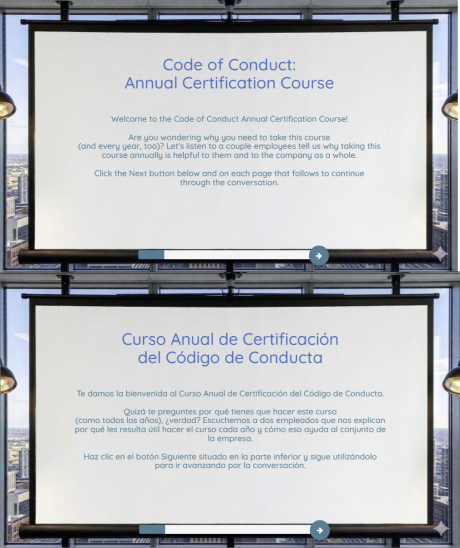
This sample uses a scenario basis for re-imagining the typical Code of Conduct course.
The characters are from our built-in People Collection of stock photos. Transitions between character poses and expressions bring a sense of life and emotion to the scenario.
The characters are presented as co-learners taking the same learning journey as the actual learner taking the course.
Using characters as co-learners provides context and other critical framing of information for the actual learners, increasing engagement and helping create meaningful value for the content.
In the English version the characters have voice over audio narration provided by our talented voice over partners, Miranda Botha and Mike Cooper.
Instead of using a standard navigation bar with Next and Back buttons, the learner works through the content using on-page trigger actions.
Completion status is shown using a custom completion status bar at the bottom of the pages.
Because of the compliance nature of the content, several pages require the learner to complete an activity before they can advance.
This example has also been translated into Spanish using dominKnow | ONE's built-in translation workflow using translation text provided by Local Concept. The Spanish version does not include voice over audio.
This sample is available as a template in dominKnow | ONE.
Sign up for a free trial to check it out!